
 Avrhil IT Services
Avrhil IT Services
Avrhil IT Services

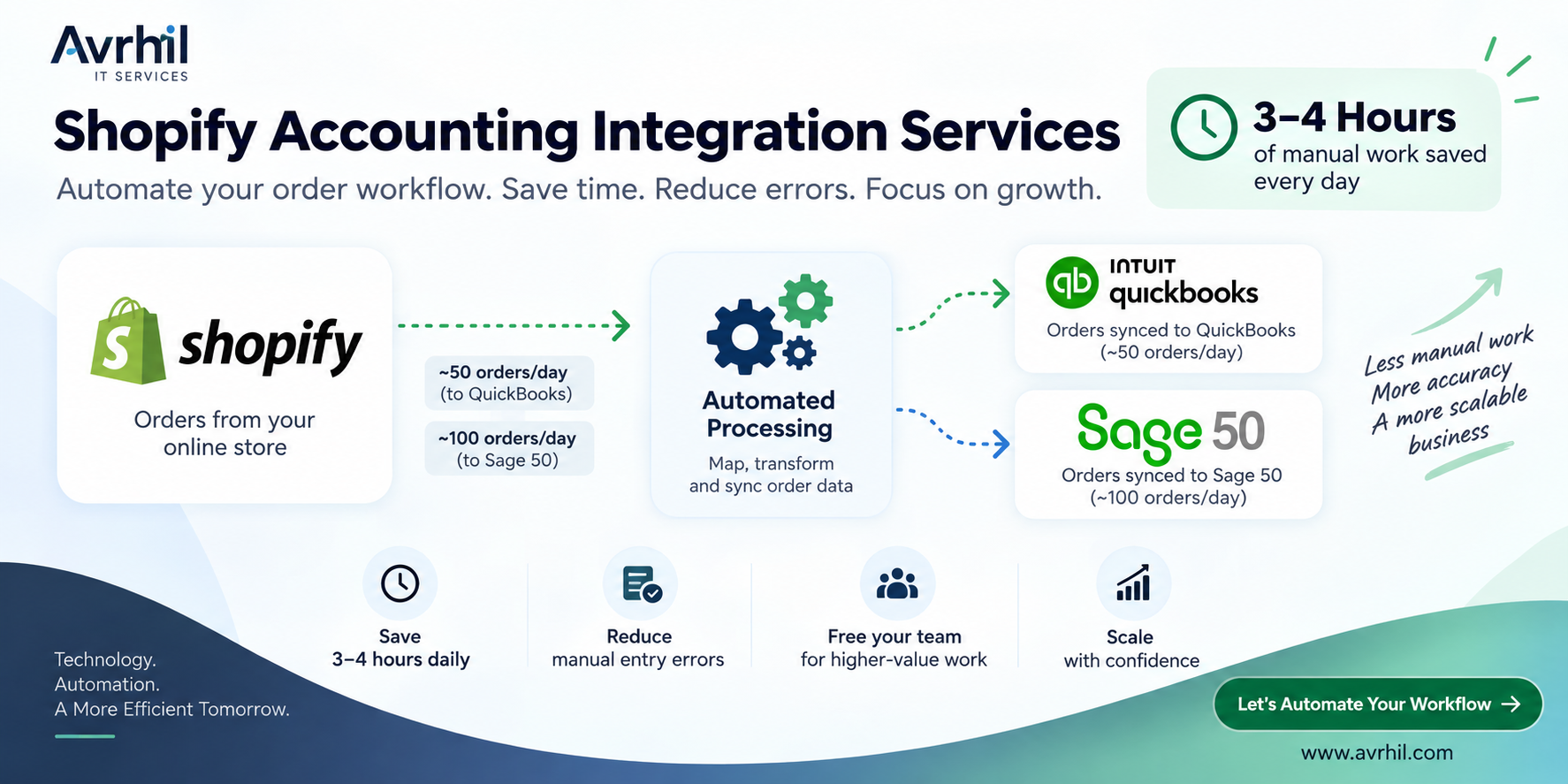
Managing a growing Shopify store is exciting—until your accounting team starts spending hours every day manually entering orders into accounting software.
At Avrhil IT Services, we built automation workflows that connect Shopify with QuickBooks and Sage 50, reducing repetitive accounting work and minimizing the errors associated with manual order entry.
When an ecommerce business receives dozens or hundreds of orders every day, manually transferring order information into accounting software quickly becomes inefficient.
Our customers were processing approximately:
At these volumes, the accounting workflow could involve entering and checking approximately 150 orders every day across two separate workflows.
The problem wasn't simply the time required.
Manual entry also creates opportunities for:
For a growing ecommerce business, this is time that accounting and operations teams could spend on higher-value work.
Instead of relying on employees to repeatedly copy order information from Shopify into accounting software, we designed automated integration workflows around each customer's accounting requirements.
For one customer, the automation processes approximately 50 Shopify orders per day.
The workflow captures Shopify order information and transfers the required data into QuickBooks according to the customer's accounting workflow.
For another customer, the automation handles approximately 100 Shopify orders per day.
The same principle is applied to create a reliable flow of Shopify order information into Sage 50.
The exact workflow can be customized depending on the customer's Shopify store, accounting system, and business requirements.
A customer places an order through the Shopify store. The order may contain customer information, products, quantities, prices, discounts, taxes, shipping, payment information, and order status.
Our integration workflow retrieves the relevant Shopify order information. Instead of requiring an employee to manually identify and enter every order, the automation processes the data programmatically.
Different systems don't always use the same field names, structures, or accounting logic. The automation maps Shopify data to the appropriate accounting fields.
| Shopify | Accounting System |
|---|---|
| Order Number | Invoice / Sales Reference |
| Customer | Customer Record |
| Product | Item |
| Quantity | Quantity |
| Price | Sales Amount |
| Tax | Tax |
| Shipping | Shipping / Relevant Account |
| Order Total | Transaction Total |
Once the data has been validated and mapped, the workflow sends the required information into the appropriate accounting system.
The transaction structure can be customized around the customer's accounting requirements.
Once the automation is operating correctly, employees no longer need to repeatedly copy order information from Shopify into the accounting system.
This is where the biggest operational benefit appears.
The most important result wasn't simply that the systems were connected. It was the amount of manual work removed from the daily accounting workflow.
Approximately 3–4 hours of manual work are saved every day.
That can translate into approximately:
That's potentially an entire working week—or more—of repetitive work removed every month.
Instead of spending those hours on data entry, the team can focus on:
Time savings are only part of the benefit.
Manual data entry creates another problem: human error.
When someone repeatedly enters dozens or hundreds of transactions, mistakes can happen.
Automation reduces the dependency on repetitive human data entry by applying a consistent workflow to every processed order.
That doesn't mean automation eliminates the need for accounting oversight. Instead, it moves the human role from:
That's a much more scalable accounting workflow.
For one customer, our automation handles approximately 50 Shopify orders per day flowing into QuickBooks.
At that volume, manual entry can quickly become a daily operational burden.
Automating the workflow means the business can process its Shopify sales data without requiring someone to manually enter every order.
The result is a faster and more consistent accounting workflow.
For another customer, the workflow handles approximately 100 Shopify orders per day flowing into Sage 50.
At 100 orders per day, even a few minutes spent on each transaction can quickly turn into several hours of administrative work.
Automation allows the business to scale order volume without necessarily scaling manual data-entry work at the same rate.
Automation helps ecommerce businesses scale their accounting workflow without increasing repetitive data entry at the same rate.
A Shopify store might start with a manageable number of orders.
At 10 orders per day, manually entering transactions may seem reasonable. At 50, 100, or several hundred orders per day, the same process becomes increasingly difficult to maintain.
There are already Shopify accounting integrations and connectors available. However, every business has a different accounting workflow.
You may have requirements around:
That's where a custom automation workflow can be valuable.
At Avrhil IT Services, we focus on understanding the existing process first and then building the automation around the business requirement.
Businesses processing a growing number of Shopify orders every day.
Teams spending significant time copying Shopify order information into accounting software.
Agencies managing multiple stores that need repeatable accounting workflows.
Businesses that want to reduce repetitive administrative work and improve process consistency.
Companies that need Shopify order information to flow into their existing accounting workflow without relying heavily on manual data entry.
Here is the real-world summary:
| Metric | QuickBooks Workflow | Sage 50 Workflow |
|---|---|---|
| Source | Shopify | Shopify |
| Destination | QuickBooks | Sage 50 |
| Average orders/day | ~50 | ~100 |
| Manual process | Automated | Automated |
| Daily manual work saved | Part of overall 3–4 hours saved | |
| Primary benefit | Reduced manual entry | Reduced manual entry |
| Additional benefit | Fewer manual-entry errors | Fewer manual-entry errors |
Shopify accounting integration is only one part of ecommerce automation.
Once the order flow is automated, businesses can look at other repetitive processes such as:
The goal isn't simply to connect two applications.
The goal is to build an automated business process.
If your team is spending hours every day manually transferring Shopify orders into accounting software, there may be an opportunity to automate the workflow.
At Avrhil IT Services, we build custom automation solutions that connect ecommerce workflows with accounting and business systems.
Our Shopify accounting automation use cases include:
Shopify → QuickBooks
Shopify → Sage 50
If you're processing dozens or hundreds of Shopify orders every day, let's look at what can be automated in your current workflow.
Save hours. Reduce repetitive data entry. Build a more scalable ecommerce operation.
Talk to Avrhil IT ServicesYes. Shopify supports accounting integrations and connectors that can synchronize relevant sales and order information with accounting systems. The exact capabilities depend on the accounting platform and integration approach.
A Shopify-to-Sage 50 workflow can be designed to move the required order information into the accounting environment, depending on the Sage 50 version, available interfaces, and the customer's accounting requirements.
The savings depend on order volume and the existing manual process. In our use case, the automation saves approximately 3–4 hours of manual work every day.
No. Automation is intended to remove repetitive data-entry work, not replace accounting judgment. Accounting teams can spend more time reviewing transactions, handling exceptions, reconciling accounts, and analyzing financial information.
Yes. As order volume increases, repetitive manual entry becomes increasingly time-consuming. Automating the workflow can help businesses process higher volumes without increasing manual data-entry work at the same rate.
For growing Shopify businesses, manual order entry can become an invisible operational cost.
~50 Shopify orders/day → QuickBooks
~100 Shopify orders/day → Sage 50
3–4 hours of manual work saved every day
Fewer opportunities for manual data-entry errors
The result is a more efficient accounting workflow that can scale with the ecommerce business.
Your Shopify store should generate sales—not hours of repetitive accounting work.
Avrhil IT Services can help automate the process.
Looking for answers about Shopify, QuickBooks, Sage 50, ERP, POS, inventory, APIs, middleware, and custom integrations? Here are answers to the most common questions businesses ask before automating their Shopify workflows.
Shopify can be integrated with QuickBooks using an existing integration app, connector, API-based solution, middleware, or a custom integration. The right approach depends on your order volume, accounting workflow, number of stores, data mapping requirements, and the level of automation you need.
Businesses that process a significant number of Shopify orders or have customized accounting requirements may benefit from working with a Shopify QuickBooks integration company rather than relying entirely on a standard connector.
Shopify orders can be synchronized with QuickBooks by connecting Shopify to QuickBooks through an integration app, middleware, API, or custom automation.
A typical automated workflow looks like this:
Depending on the requirements, the workflow can process information such as customers, products, quantities, prices, discounts, taxes, shipping, payments, refunds, and order status.
For higher-volume or customized workflows, a custom integration can also include duplicate prevention, validation, error handling, logging, and exception processing.
Multiple Shopify stores can be connected to one or more QuickBooks environments through a centralized integration architecture.
For example, a business may operate multiple Shopify stores for different brands, regions, markets, or product lines while maintaining centralized accounting.
A custom workflow can apply different mappings, customers, products, tax rules, locations, or accounting treatment depending on the source Shopify store.
This can be particularly useful when standard integration apps do not provide the required multi-store logic.
Avrhil IT Services builds custom ecommerce and business-system integrations, including workflows that connect Shopify with accounting platforms such as Sage 50.
In one of our use cases, we automated approximately 100 Shopify orders per day → Sage 50, helping remove repetitive manual order-entry work from the accounting process.
Yes. Shopify can be integrated with ERP systems to automate the movement of ecommerce data between the online store and back-office systems.
Depending on the retailer's requirements, an integration can synchronize:
For retailers operating multiple sales channels, Shopify ERP integration can provide a central flow of operational and financial data between ecommerce, inventory, accounting, and back-office systems.
Shopify inventory can be synchronized with a POS system using a native integration, connector, middleware platform, or custom API integration.
A typical inventory workflow may look like:
The exact direction of synchronization depends on which system is the source of truth for inventory.
A well-designed integration should account for inventory adjustments, sales, returns, stock transfers, multiple locations, and synchronization failures where applicable.
Shopify POS accounting integration connects point-of-sale transactions with an accounting or ERP system so that financial data does not have to be manually re-entered.
Depending on the accounting workflow, the integration may process sales, taxes, payments, refunds, products, customers, and other relevant transaction information.
For retailers operating both Shopify ecommerce and physical stores, integrating Shopify, POS, and accounting systems can help create a more consistent flow of financial information across sales channels.
A Shopify API integration can be developed by an experienced ecommerce integration company or software development team familiar with Shopify's APIs and the target business system.
Avrhil IT Services builds custom automation and integration workflows around ecommerce, accounting, ERP, CRM, and other business systems.
Custom API integration can be useful when your workflow requires specialized data mapping, business rules, validation, synchronization, exception handling, or connections between multiple systems.
Shopify integration middleware is a software layer that sits between Shopify and other business applications.
Instead of building every system-to-system connection independently, middleware can provide a centralized location for data transformation, routing, validation, business rules, monitoring, and error handling.
Middleware becomes particularly useful when a business needs to connect Shopify with multiple systems or multiple Shopify stores.
There isn't one universal alternative that is best for every business. The right option depends on the complexity of your workflow.
Common approaches include:
A custom integration can be a better alternative when standard apps cannot handle your specific business rules, data mapping, order volume, multiple stores, accounting structure, or exception-handling requirements.
Custom Shopify integration is worth considering when an off-the-shelf connector does not adequately support your business workflow.
Common situations include:
Shopify ERP integration does not have one fixed price. The cost depends on the systems involved, integration complexity, number of workflows, data volume, API requirements, and the level of customization required.
Factors that can affect the project cost include:
For this reason, a proper integration estimate should be based on the actual workflow rather than a generic per-integration price.
Avrhil can evaluate the current process and scope the integration based on the systems, workflows, and automation requirements involved.
The timeline depends on the complexity of the integration. A simple one-way synchronization can be considerably faster than a multi-system, multi-store integration with complex accounting and inventory rules.
A typical project may involve:
The actual timeline should therefore be estimated after reviewing the Shopify store, ERP/accounting platform, data requirements, order volume, and integration scope.
Avrhil IT Services helps ecommerce businesses automate Shopify workflows with QuickBooks, Sage 50, ERP, POS, inventory, and other business systems.
Our real-world use case includes approximately 50 Shopify orders/day → QuickBooks and 100 Shopify orders/day → Sage 50, with approximately 3–4 hours of manual work saved every day.
Talk to Avrhil IT ServicesBook a free 30-min call. We'll map out your strategy.