
 Avrhil IT Services
Stop re-keying orders and fixing stock mismatches. Our WooCommerce ERP integration syncs orders, inventory, products, customers, pricing and fulfillment in both directions — with SAP, Dynamics 365, Oracle, Odoo, ERPNext or a custom ERP.
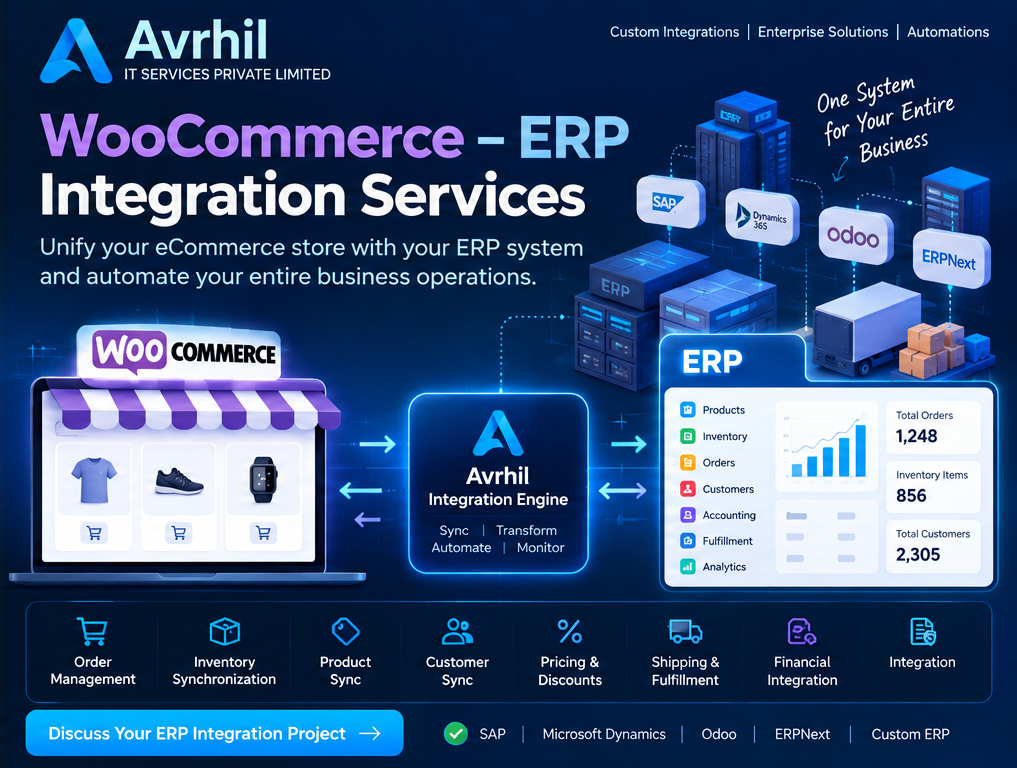
Running eCommerce without ERP integration usually means juggling multiple disconnected systems — sales in WooCommerce, inventory in the ERP, orders processed by hand and finances kept separately.
Your sales team works in WooCommerce while inventory lives in the ERP. Orders get keyed in manually and financial records are maintained apart from everything else. The gaps between systems turn into daily operational friction.
Our WooCommerce–ERP integration removes those disconnected workflows by synchronizing business-critical information across your systems, so every team works from the same accurate data.
From order capture to fulfillment, your ERP and store stay aligned on one set of data.
WooCommerce orders flow into the ERP for processing the moment they land.
ERP stock levels drive WooCommerce availability in real time.
Catalog and pricing managed in the ERP and published to the store.
Shipments and tracking pushed back to WooCommerce and customers.
End-to-end synchronization across every business-critical area of your store and ERP.
We build integrations for multiple ERP platforms and custom enterprise applications.
Connect WooCommerce with SAP Business One and SAP S/4HANA based on your system architecture and available interfaces.
Integrate WooCommerce with Dynamics 365 Business Central and Finance & Operations.
Connect your eCommerce platform with Oracle ERP applications through supported APIs and integration interfaces.
Synchronize orders, products, customers, inventory and accounting information with Odoo.
Automate product, inventory, order and customer synchronization between WooCommerce and ERPNext.
Have an internally developed ERP? We build custom API integrations using your existing application architecture.
WooCommerce ↔ Avrhil Integration Engine ↔ ERP — controlled, monitored communication between your store and ERP.
WooCommerce generates an order or product update.
The integration engine receives the event through webhooks or scheduled synchronization.
Data is validated and transformed.
Business rules determine the appropriate ERP operation.
ERP records are created or updated.
ERP inventory, pricing and fulfillment information can be synchronized back to WooCommerce.
Execution logs, errors and synchronization status are monitored.
Enterprise-grade capabilities built into every integration we deliver.
Our WooCommerce–ERP integration services are suitable for a wide range of businesses.
Beyond basic API integration — we build reliable workflows that support your complete business operations.
Enterprise integration is more than moving data between applications. We design workflows that reflect how your business actually operates, and that can grow with you.
WooCommerce running as a storefront over the ERP through our integration layer.
WooCommerce ERP integration is the automated, two-way exchange of data between your WooCommerce store and your ERP. New orders flow into the ERP for processing, while stock levels, prices, product data and shipment tracking flow back to the store. The ERP stays the system of record, and the store always shows accurate availability and pricing without anyone copying data by hand.
The most important design decision in any WooCommerce ERP integration is the source of truth for each data type. This is the pattern we typically start from, then adjust to your business.
| Data | Usually mastered in | Direction | Typical trigger |
|---|---|---|---|
| Orders | WooCommerce | WooCommerce → ERP | Webhook on order created or paid |
| Stock levels | ERP | ERP → WooCommerce | On stock movement, or a short scheduled interval |
| Products & SKUs | ERP (or PIM) | ERP → WooCommerce | On change, or nightly batch |
| Prices & price lists | ERP | ERP → WooCommerce | On change, including customer-specific and wholesale tiers |
| Customers | Shared | Both ways | On registration, checkout or account change |
| Shipments & tracking | ERP / WMS | ERP → WooCommerce | On dispatch, which also sets the order status and emails the customer |
| Invoices, payments & refunds | ERP | Both ways | On payment capture or refund |
There is no single right answer. This comparison shows where each approach fits and where it starts to break down.
| Approach | Best for | Limitations |
|---|---|---|
| CSV import / export | Very low order volumes and one-off catalog loads | Manual, error-prone, never real time, and stock is always out of date |
| Off-the-shelf WooCommerce ERP plugin | Standard setups on one popular ERP | Fixed field mappings, limited handling of custom pricing, bundles or multi-warehouse rules, and the plugin runs inside your WordPress server |
| Generic middleware (Zapier-style) | Simple one-way triggers | Per-task pricing climbs with order volume, and weak retry, deduplication and reconciliation for ERP-grade data |
| Custom integration (Avrhil) | Custom ERPs, B2B pricing, multi-warehouse, multi-store, high volume | Needs a short discovery phase to agree mappings and rules up front |
Most projects are not a plain "sync orders" job. These are the situations where a purpose-built integration earns its keep.
Customer-specific price lists, volume breaks and credit terms live in the ERP. The store shows each logged-in buyer the right price and enforces the right terms.
Stock is held in several locations. We publish an available-to-sell figure to WooCommerce and route each order to the right warehouse.
Kits and variable products rarely map one-to-one. We map WooCommerce variations and bundles onto ERP item structures and bills of materials.
Several WooCommerce sites, regions or brands feed one ERP. Orders are tagged by source, and each store gets its own catalog and price rules.
Black Friday traffic should not overload your ERP API. Queues and background workers smooth the load so no order is dropped.
No modern API? We integrate through database access, file exchange, SOAP or a thin API layer we build in front of your system.
Each ERP exposes data differently. We have dedicated pages for the most requested platforms.
It depends on your ERP and how custom your processes are. A standard plugin can work for simple setups on a popular ERP. If you have custom pricing, several warehouses, multiple stores, a legacy ERP or high order volumes, a custom integration with queues, retries and monitoring is usually the more reliable choice.
It depends on the ERP, the number of data flows and how many custom rules apply. We start with a short discovery phase to agree the data mappings and source of truth for each flow, then give you a scoped plan and timeline. Orders and inventory are usually the first flows delivered.
No. Heavy processing runs outside WordPress in the integration engine, so checkout speed is not affected. WooCommerce only sends lightweight webhook events and receives updates.
The order is queued and retried automatically once the ERP is reachable. Duplicate protection means a retry never creates a second order, and failures are logged and flagged for review.
We can integrate with ERP systems that provide accessible APIs, database interfaces or other supported integration mechanisms.
Yes. We can configure inventory synchronization based on your source-of-truth rules, warehouse structure and stock allocation requirements.
Yes. We can build multi-store integration architectures that consolidate orders, inventory and customer information into a central ERP.
Yes. We develop custom integrations for internally developed ERP platforms and legacy enterprise applications.
Yes. We can design scalable processing using queues, background workers, batching, retries and monitoring, depending on transaction volumes and system API limits.
Explore the other ways we connect WooCommerce to ERP and accounting systems.
Your WooCommerce store and ERP should work as one connected business ecosystem. Let Avrhil IT Services design and implement a custom integration that automates your operations, improves data accuracy and supports business growth.
Discuss Your ERP Integration Project See Case Studies